Get the step-by-step solution for this question inside the Vidyadip app.
Get the answer in the appGenerate a complete, print-ready paper with questions like this in minutes — across 16+ boards, with answer keys.
Write a program to generate a dictionary that contains (i, i*i) such that it is an integral number between 1 and n (both included) and then the program should print the dictionary.
For the following input is supplied to the program:
Then, the output should be:
{1: 1, 2: 4, 3: 9, 4: 16, 5: 25, 6: 36, 7: 49, 8: 64}
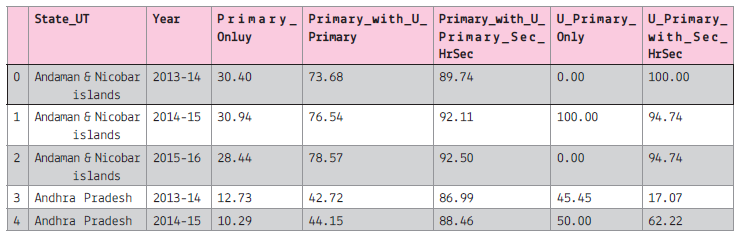
data name : Percentage of Schools with Computers from 2013-14 to 2015-16
Screen shot of the data:
Assuming that we have saved the file with name: "computer_data" in python default folder.
Assuming that all the required libraries are imported once:
(i) To create the data frame of the above file.
(ii) To display all the column names of the data frame.
(iii) To plot the line graph for the first 5 record of the Primary Only column on y-axis and 'State_UT' on x-axis.
The line colour should be red and marker as 'x'. The graph will display only 2013-14
(iv) To display the histogram of the 2013-14, primary_only column.
(v) To display bar graph of the last 7 record of the year 2013-14 use the title and required label. Also write the statement to create the data frame.
(vi) To display the pie chart of the first 10 records of the 2013-14. Also create the data frame.
(vii) To display the boxplot for the Sec with higher secondary and All India data.
(viii) To display the scatter diagram of the 2014-15
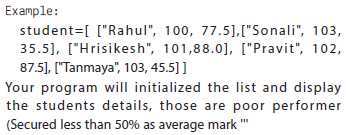
( i.e: student_name, roll_number, avg_marks )
Write SQL commands for (a) to (f) and write the outputs for (g) on the basis of tables FURNITURE and ARRIVALS
Table: FURNITURE
| NO | ITEMNAME | TYPE | DATEOFSTOCK | PRICE | DISCOUNT |
| 1 | White lotus | Double Bed | 23/02/2002 | 30000 | 25 |
| 2 | Pink feather | Baby cot | 20/01/2002 | 7000 | 20 |
| 3 | Dolphin | Baby cot | 19/02/2002 | 9500 | 20 |
| 4 | Decent | Office Table | 01/01/2002 | 25000 | 30 |
| 5 | Comfort zone | Double Bed | 12/01/2002 | 25000 | 25 |
| 6 | Donald | Baby cot | 24/02/2002 | 6500 | 15 |
| 7 | Royal Finish | Office Table | 20/02/2002 | 18000 | 30 |
| 8 | Royal tiger | Sofa | 22/02/2002 | 31000 | 30 |
| 9 | Econo sitting | Sofa | 13/12/2001 | 9500 | 25 |
| 10 | Eating Paradise | Dining Table | 19/02/2002 | 11500 | 25 |
Table: ARRIVALS
| NO | ITEMNAME | TYPE | DATEOFSTOCK | PRICE | DISCOUNT |
| 1 | Wood Comfort | Double Bed | 23/03/2003 | 25000 | 25 |
| 2 | Old Fox | Sofa | 20/02/2003 | 17000 | 20 |
| 3 | Micky | Baby cot | 21/02/2003 | 7500 | 15 |
(a) To show all information about the Baby cots from the FURNITURE table.
(b) To list the ITEMNAME which are priced at more than 15000 from the FURNITURE table.
(c) To list ITEMNAME and TYPE of those items, in which date of stock is before 22/01/2002 from the FURNITURE table in descending order of ITEMNAME.
(d) To display ITEMNAME and DATEOFSTOCK of those items, in which the discount t percentage is more than 25 from FURNITURE table.
(e) To count the number of items, whose TYPE is “Sofa ”from FURNITURE table.
(f) To insert a new row in the ARRIVALS table with the following data:
14,“Valvet touch ”, “Double bed ”, {25/03/03}, 25000,30
(g) Give the output of following SQL statement
Note: Outputs of the above mentioned queries should be based on original data given in both the tables i.e., without considering the insertion done in (f) part of this question.
(i) Select COUNT(distinct TYPE) from FURNITURE;
(ii) Select MAX(DISCOUNT) from FURNITURE, ARRIVALS;
(iii) Select AVG(DISCOUNT) from FURNITURE where TYPE=”Baby cot ”;
(iv) Select SUM(Price) from FURNITURE where DATEOFSTOCK <12/02/02;

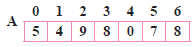
Write the complete steps to sort the above along with each pass explanation.
Consider the following tables Product and Client. Write SQL commands for the statements (i) to (iv) and give outputs for SQL queries (v) to (viii)
TABLE: PRODUCT
| P_ID | Product Name | Manufacturer | Price |
| TP01 | Talcom Powder | LAK | 40 |
| FW05 | FaceWash | ABC | 45 |
| BS01 | Bath Soap | ABC | 55 |
| SH06 | Shampoo | XYZ | 120 |
| FW12 | Face Wash | XYZ | 95 |
TABLE: CLIENT
| C_ID | ClientName | City | P_ID |
| 01 | Cosmetic Shop | Delhi | FW05 |
| 06 | Total Health | Mumbai | BS01 |
| 12 | Live Life | Delhi | SH06 |
| 15 | Pretty Woman | Delhi | FW12 |
| 16 | Dreams | Bangalore | TP01 |
(i) To display the details of those Clients whose City is Delhi
(ii) To display the details of Products whose Price is in the range of 50 to 100 (Both values included)
(iii) To display the ClientName, City from Table Client, and ProductName and Price from table Product, with their corresponding matching P_ID
(iv) To increase the Price of all Products by 10
(v) SELECT DISTINCT CITY FROM Client;
(vi) SELECT Manufacturer, MAX(Price), Min(Price), Count(*) FROM Product GROUP BY Manufacturer;
(vii) SELECT ClientName, ManufacturerName FROM Product, Client WHERE Client.Prod_Id = Product.P_Id;