Question types

MS-Excel 2007 question types

90 questions across 7 question groups — pick any mix to generate a Information Technology paper with step-by-step answer keys.

90
Questions
7
Question groups
5
Question types
Sample Questions

MS-Excel 2007 questions

One sample from each question group in this chapter. Select any group above to see the full set with answer keys.

Q 1MCQ1 Mark
The sample of an Excel worksheet on the screen can be seen by ………………..
  • Print preview
  • B
    Print
  • C
    Review
  • D
    None of the above

Answer: A.

View full solution
Q 2MCQ1 Mark
For selecting the entire worksheet in Excel, you need to press ……………….
  • A
    Alt + Shift + eSpacebar
  • Ctrl + Shift + Spacebar
  • C
    Shift + Spacebar
  • D
    None of the above

Answer: B.

View full solution
Q 3MCQ1 Mark
For selecting a non-continuous range of cells, you need to do what?
  • A
    Press Alt key
  • Press Shift key
  • C
    Press Esc key
  • D
    Press Ctrl key

Answer: B.

View full solution
Q 4MCQ1 Mark
Which of the following shortcut keys brings the cursor to the last cell on the sheet that contains data?
  • A
    Ctrl+Home
  • Ctrl+End
  • C
    Ctrl + Page down
  • D
    Ctrl+down arrow

Answer: B.

View full solution
Q 5MCQ1 Mark
The another name for the XY chart is ……………….
  • A
    Column chart
  • B
    Net chart
  • C
    Bar chart
  • Scatter chart

Answer: D.

View full solution
The $…….....$ tool is used in speadsheet that creates a growth series, wherein subseguent values follow an increasing or a decreasing geometric pattern.
View full solution
Hansika wants to apply MIN function on a cell range, but all the values in that range are of Boolean. What value will be returned by the MIN function?
View full solution
Neha Mittal wants to store data of her montly expenditure for a period of two year and also wants to perform some calculation and analysis. Which Microsoft application, will you suggest Neha should use for this purpose and why?
View full solution
  1. Arihant stationery keeps stock of various stationeries in his shop. The proprietor wants to maintain a stock value and reorder level for following items as given in a spreadsheet. Write formulas for the operations (i) to (iii) and answer the questions (iv) and (v) based on the spreadsheet given below alongwith the relevant cell address:
    1. To calculate the Stock Value as product of ‘Quantity in Stock1 and ‘Rate’ for each item present in the spreadsheet.
    2. To calculate the ‘Quantity to Order’ as ‘Minimum Stock Quantity’-‘Quantity in Stock’ for each item.
    3. To calculate the ‘Order Value’ as product of ‘Quantity to Order’ and ‘Rate’ for the items if ‘Quantity to Order’>=0, else assign the value as 0.
    4. Proprietor wants to graphically represent his stationery stock. Suggest him the most appropriate feature of MS-Excel.
    5. If Quantity in Stock’s value changes, will have to redo all the calculations for that particular column? Explain.
View full solution
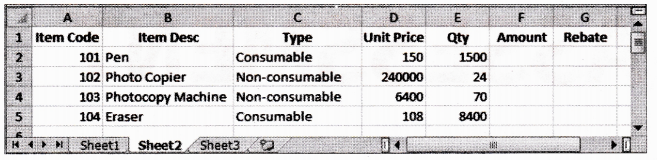
  1. Write command for the operations (i) to (iii) based on the spreadsheet below:
Image
  1. To calculate the Amount as Unit Price*Qty for each item in Column F.
  2. To calculate the Rebate as 7% of Amount if Type is consumable, else calculate Rebate as 11% of Amount in Column G.
  3. To calculate total Rebate across all items in cell G6
View full solution
In a worksheet, cell K12 has a value. A formula is to be entered in cell K15, such that if the value in cell K12 is more than 300, the value in cell K15 would be 1.33 times the value of cell K12. Otherwise, the value in cell K15 would be 1.5 times the value in cell K12. Explain the formula that you use to achieve this.
View full solution

Generate a MS-Excel 2007 paper free

Pick question groups from the list above, set marks and difficulty, and export a branded PDF with step-by-step answer keys. First 3 chapters free — no signup.

Download App